Create a Social Post from Any Civic Translator Meeting Summary
Open a detailed meeting summary, copy its ready-made ChatGPT prompt, and choose Facebook, Instagram, or X. You do not need to save or upload the infographic image.
1. Open a Detailed Meeting Summary
Browse Civic Translator and select the meeting you want to share. Open the detailed summary page for that meeting.
- Select Browse Meeting Summaries.
- Choose a state, public body, and meeting.
- Open the detailed meeting summary page.
2. Copy the ChatGPT Social Post Prompt
On the detailed meeting summary page, select Copy Social Post Prompt for ChatGPT.
The copied prompt includes the meeting summary, the page URL, and instructions for creating a factual and neutral social post. There is no need to copy the summary manually or save the infographic image.
3. Paste the Prompt into ChatGPT
- Open ChatGPT.
- Start a new chat.
- Paste the copied prompt and send it.
- ChatGPT will ask which platform you want:
- X
- Reply with 1, 2, or 3.
- Review the generated post before publishing it.
4. See What the ChatGPT Prompt Looks Like
After you paste the copied prompt into ChatGPT, it will ask you to choose Facebook, Instagram, or X. Reply with the number for the platform you want, and ChatGPT will build the matching social post.
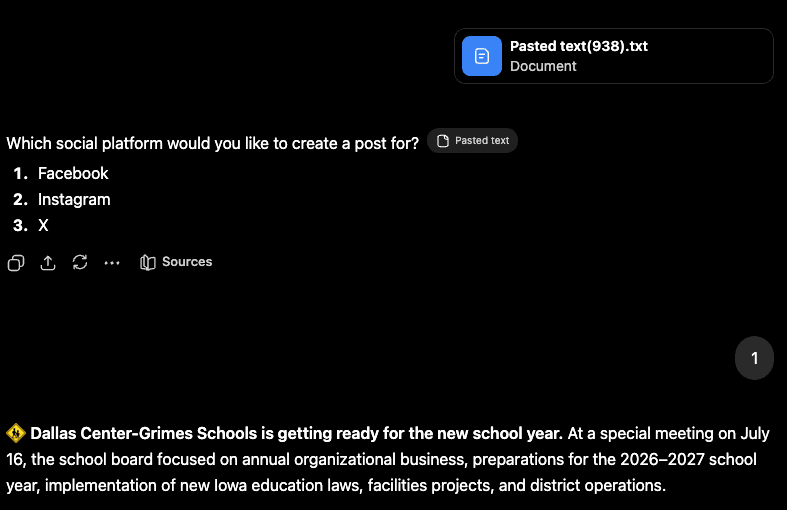
Example: reply with 1 for Facebook, 2 for Instagram, or 3 for X.
5. Review and Refine the Draft
Confirm that the post accurately reflects the meeting summary and remains factual, neutral, and non-partisan.
You can ask ChatGPT to revise the result with instructions such as:
- “Make it shorter.”
- “Use a friendlier tone.”
- “Make the key decisions easier to scan.”
- “Rewrite this for parents and community members.”
6. Check the Facebook Link Preview
Before publishing on Facebook, confirm that the meeting summary link displays the correct title and preview image.
- Open the Facebook Sharing Debugger.
- Paste the Civic Translator meeting summary URL.
- Select Debug.
- Review the title, description, and preview image.
- Select Scrape Again when Facebook shows an older cached preview.
Important Reminder
Civic Translator summaries are generated from publicly available meeting materials and transcripts. They help residents understand public meetings, but they do not replace official minutes, agendas, packets, recordings, or public-body records.
Review the official meeting materials whenever additional context is needed.
Browse Meeting Summaries